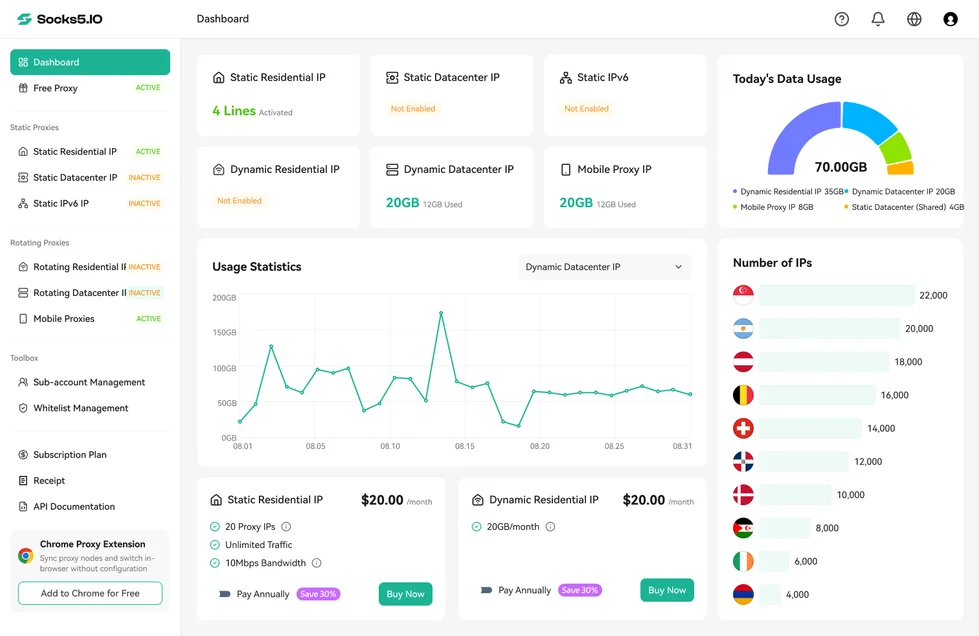
The best mobile proxy depends on the country and carrier you need, how long each task must keep the same IP, and how much traffic you will use. Regional ad checks need the right exit location; multi-step browser tasks need session continuity. For occasional jobs, traffic expiry can matter as much as the price per gigabyte.
This guide covers seven mobile proxy providers for small pay-as-you-go (PAYG) purchases, recurring data collection, longer sessions, detailed location targeting, and dedicated SIM access. Compare their entry costs, session controls, and traffic validity to find a service that fits your workload.
Key Takeaways
- Choose a mobile pool for checks across countries; choose dedicated SIM access for sustained work through an assigned mobile connection.
- For occasional projects, compare traffic expiry and minimum purchase amounts. For recurring work, compare the cost of the traffic you will actually use.
- For traffic spread across several months, Socks5.IO’s 200 GB, 500 GB, and 1,200 GB bundles offer 180-day validity, making them useful for planned batches with gaps between runs.
- A dedicated SIM can still share a public IP through the carrier. Start with a small purchase to check session behavior and task completion in your own workflow.
What Is a Mobile Proxy, and When Do You Need One?
A mobile proxy forwards traffic through a cellular connection using an IP assigned by a mobile carrier. The client can be a desktop browser, script, or application; the mobile part is the network exit.
Use mobile proxies to check regional ads, test your service from carrier-network exits, or collect public data that requires a cellular connection. Pair the proxy with a real device or an appropriate browser environment for screen, browser, or GPS-dependent testing.
Carrier-grade NAT (CGNAT) allows multiple subscribers to share a public IPv4 address. This explains why dedicated SIM access and exclusive public-IP ownership are different purchasing requirements. An assigned SIM can still use a public address shared at the carrier level.
Best Mobile Proxy Providers 2026
| Provider | Recommended for | Published pricing examples | Main consideration |
|---|---|---|---|
| Socks5.IO | Country targeting and flexible sessions | Public page: $5.50/GB PAYG; 50 GB at $2.70/GB | 50 GB package expires in 30 days |
| Decodo | Small purchases; city or ASN targeting | Promo: 2 GB $7.50/month; 50 GB $150/month; PAYG $4/GB, all + VAT | Promotional rate; VAT additional |
| Oxylabs | Detailed geographic filters | Starter: $15/month, up to 2 GB mobile at $7.50/GB | Shared subscription balance; VAT may apply |
| SOAX | Configurable rotation and routing | US/Tier 1: Sandbox $5/GB; Builder $200/month incl. 200 credits, $3/GB + VAT | Rates vary by exit-country tier; 100 GB US on Builder totals $300 + VAT |
| Rola IP | Predictable monthly traffic | $5/GB PAYG; 50 GB for $150 | 30-day package validity |
| DataImpulse | Occasional work without traffic expiry | New-customer offer: $5 for 2.5 GB | Standard Basic purchase: $50 for 25 GB; traffic does not expire |
| AirProxy | Dedicated SIM access | €67/30 days; €9.90/72-hour trial | Per-proxy fee rather than per-GB billing |
Public pricing checked November 23, 2026. Promotional rates and tax conditions are noted in the table.
Targeting, Sessions, and Purchase Conditions
| Provider | Location or network selection | Published session controls | Traffic validity or access period |
|---|---|---|---|
| Socks5.IO | Country targeting | Per-request rotation; standard 10-minute sticky session with an idle reset within 60 seconds | 50 GB bundle: 30 days; 200/500/1,200 GB bundles: 180 days |
| Decodo | Country, city, carrier/ASN | Rotating or configurable sticky sessions | PAYG and monthly subscription options |
| Oxylabs | Continent, country, state, city, coordinate, ASN | Per-request rotation; advertised 24-hour sticky option | Subscription balance shared across supported products |
| SOAX | Country, region, city, ISP; ASN/ZIP on Scale and Enterprise | Rotate per request, request count, time, or error; sticky mode | Monthly-plan credits: 60 days from addition; annual-plan credits: 12 months |
| Rola IP | Country; carrier in supported markets | Per-request rotation; sticky sessions up to 120 minutes | Traffic packages: 30 days, without rollover |
| DataImpulse | Country targeting included | Rotating; sticky sessions up to 120 minutes | Purchased traffic does not expire |
| AirProxy | Dedicated SIM connection in Italy | Dashboard/API IP changes and automatic rotation | 30-day access or paid 72-hour trial |
7 Mobile Proxy Providers Compared
1. Socks5.IO: Country Targeting and Session Control

Socks5.IO provides 4G/5G mobile proxies for country-level ad checks, localized content reviews, and public-data collection. It supports HTTP(S) and SOCKS5, so you can use it with a proxy-compatible browser, script, or application. It fits projects that need to switch between countries and choose how related requests share an exit.
Socks5.IO’s mobile proxy session controls offer per-request rotation for independent checks and a standard 10-minute sticky session for related requests. Sticky mode suits short browsing sequences such as opening a page, applying filters, and reading the result. The documented idle reset occurs within 60 seconds without requests, so keep related steps close together and start a new session for the next task.
Socks5.IO offers PAYG traffic and bandwidth bundles. PAYG suits irregular checks, while bundles suit planned batches. On the public product page, the 50 GB bundle is valid for 30 days; the 200 GB, 500 GB, and 1,200 GB bundles are valid for 180 days. The longer window suits teams running periodic ad checks or data-collection batches over several months, with time between runs to use the remaining traffic. Choose the bundle by the volume you expect to consume within that period.

2. Decodo: Small Starting Purchases

Decodo combines 3G/4G/5G mobile exits with city and ASN targeting. It is useful when a country-level result is too broad: a local campaign review may need a particular city, while carrier-specific testing needs an exit from the relevant network. ASN targeting selects the network rather than just the geographic area.
HTTP(S) and SOCKS5 support lets you connect existing browser and scripting tools. Rotating sessions suit collecting separate pages across locations; sticky sessions suit following a browsing sequence through one exit. These controls make it a practical option for teams doing both regional spot checks and repeated mobile-network data collection.

PAYG and monthly subscriptions accommodate different schedules. PAYG fits occasional jobs; a monthly allowance fits regular monitoring. Compare the promotional price with the renewal price and cancellation terms shown at checkout before choosing a recurring purchase.
3. Oxylabs: Precise Location Targeting

Oxylabs is a strong candidate for mobile-network checks that need more precision than a country or city filter. Its 3G/4G/5G/LTE pool supports continent, country, state, city, coordinate, and ASN selection without separate targeting fees. This is useful for comparing localized offers or checking how your service responds to a particular region or carrier network.
Per-request rotation supports independent data-collection requests, while its documented 24-hour sticky-session option accommodates longer browsing workflows. HTTP(S) and SOCKS5 endpoints connect to existing clients, and a single gateway handles exit selection, removing the need to maintain and replace individual proxy lists.

Its subscription balance can be spent across mobile proxies and other supported products. That model suits teams combining mobile checks with other data-collection services. For a mobile-only project, the main reasons to choose Oxylabs are its detailed targeting and longer session option.
4. SOAX: Custom Rotation Rules

SOAX suits mobile-data workflows that need different rotation rules for different jobs. Its 3G/4G/5G proxies can rotate on every request, after a set number of requests, on a timer, or when an error occurs. A collection job can change exits after each batch, while a multi-step browser task uses a sticky session.
Country, region, city, and ISP targeting help narrow the exit to the audience or network being checked. ASN and ZIP filters are available on Scale and Enterprise. Those plan requirements matter if your shortlist depends on a specific autonomous system or postal area.
Proxy packages separate authentication, routing rules, limits, and usage tracking by project. That gives teams a way to run several workflows without applying one configuration to everything. HTTP(S) and SOCKS5 are supported.
Sandbox offers usage-based access; paid plans include credits. Usage rates depend on the exit country’s tier, so the countries you need influence the buying decision alongside traffic volume.
5. Rola IP: Predictable Monthly Usage

Rola IP offers 4G/5G mobile proxies for regional content checks and recurring data collection. Its mobile product page describes country targeting and carrier selection in supported markets, making it relevant for checks that need a particular national market or mobile network.
Per-request rotation suits collecting independent pages, and sticky sessions can keep related requests on one exit for up to 120 minutes. That gives longer browsing sequences more room than a short session window, making Rola IP relevant when a job combines regional targeting with several steps.

PAYG traffic suits variable workloads; prepaid packages suit work concentrated within a month. Packages last 30 days and unused traffic does not roll over. Rola IP therefore fits predictable monthly activity better than projects with long gaps between runs, where non-expiring traffic may be more useful.
6. DataImpulse: Occasional Projects

DataImpulse is useful for mobile-proxy projects that run intermittently. Purchased traffic does not expire, and there is no monthly subscription, so a balance can serve a short localization review now and another project later. That purchasing model suits freelancers, small teams, and workloads with uneven demand.
Its 3G/4G/5G/LTE network includes country targeting, HTTP(S), and SOCKS5 support. Country selection is included in the traffic price, making it suitable for comparing your site’s content or public search results across national markets.
Rotating mode changes the exit for independent requests; sticky sessions can last up to 120 minutes. The longer window is useful when a browser task includes navigation, filtering, and several related page loads.
Configuration guides cover tools such as Playwright, Puppeteer, and Selenium. Teams already using these tools can add the proxy connection to an existing workflow, while the non-expiring balance accommodates pauses between development and scheduled runs.
7. AirProxy: Dedicated SIM Access

AirProxy suits sustained work through an Italian mobile connection. It provides a dedicated SIM hosted on its own infrastructure, so you receive a proxy connection without buying or maintaining a modem. This is a different buying model from drawing exits from a multi-country mobile pool.
IP changes can be triggered through the dashboard or API, or run at configured intervals and scheduled times. You can align rotation with the end of a browsing task instead of changing the address during a sequence. The dedicated SIM is assigned to your use; the carrier can still share its public IP through CGNAT.
Access is sold for a fixed period with unlimited bandwidth advertised, making it relevant for traffic-heavy Italian workflows. Additional dedicated connections require additional proxies, so the number of simultaneous connections you need matters alongside data volume.
A paid 72-hour trial provides a shorter entry option, and renewal is manual. Choose AirProxy when an assigned Italian connection is the priority; use a multi-country pool when the job requires switching between national markets.
4G vs. 5G Mobile Proxies: Which Should You Buy?
4G/LTE and 5G describe the cellular connection behind the proxy. Choose the required country, carrier, session behavior, and buying model first; use the network generation to decide whether additional connection capacity is worth paying for.
Speed and Latency
5G offers potential gains in connection capacity and radio latency. Coverage, spectrum, network load, gateway routing, and the destination server together determine end-to-end performance. Compare task completion times under the same conditions before paying a premium for 5G access.
For small HTML responses and occasional regional checks, prioritize 4G coverage, session continuity, and cost. Compare 5G options for larger transfers or several active sessions through one dedicated connection. Per-GB charges are based on traffic volume.
Location, Sessions, and Network Selection
Evaluate carrier selection, sticky-session length, public-IP sharing, and target access separately from network generation. A 4G plan with the required carrier and sufficient session time can serve a workflow better than a 5G offer with unsuitable routing or session controls.
For a 5G-specific task, choose a selectable or reserved 5G connection and use provider-side device information to identify the radio network. Use ASN and geolocation lookups to identify the exit’s network owner and reported location.
Socks5.IO and Rola IP list 4G/5G mobile access. Decodo, Oxylabs, SOAX, and DataImpulse also list both generations, alongside 3G or LTE on some services. AirProxy describes 4G access through a dedicated SIM in Italy.
When the Upgrade Makes Sense
Choose 4G when it completes the workflow within your time and capacity requirements at a lower total cost. Consider 5G when the cellular connection is the bottleneck, the required region has suitable availability, and the improvement justifies the premium. For dedicated connections, include rotation downtime in the comparison: faster transfers provide little benefit if frequent reconnection dominates the job.
How Do You Choose a Mobile Proxy for Your Workload?
To compare the best mobile proxies, define five requirements: exit location, session continuity, connection capacity, buying model, and total cost. Use these to eliminate unsuitable plans before making a trial purchase.
1. Define the Required Exit Location
Start with the location the task actually needs. A national content check can use a country-level exit. A carrier-specific check needs network selection, while a local campaign check may require a city filter.
Choose a plan with the required country, city, or carrier filter and available exits in that region. Prioritize usable inventory for that location over the provider’s global pool total.
Use the exit location to assess regional coverage. The gateway is where your application enters the proxy service; the exit IP is what the destination sees.
2. Set Session and Concurrency Requirements
Use rotation for independent checks and a sticky session for a sequence that needs the same exit. For example, several steps in one browser test can share a session, while a separate regional check can begin a new one.
Match the session window to the full task, including pauses and retries. A ten-minute task leaves no margin in a ten-minute session: choose a longer supported window or divide the workflow at a point where a new exit is acceptable.
For parallel jobs, distinguish simultaneous connections from distinct exit IPs. Ten connections can share one public IP. If each job needs a different exit, include that requirement alongside the connection limit when choosing the session configuration.
3. Choose a Pool or Dedicated SIM
A mobile pool suits jobs across different countries or rotating exits. Dedicated SIM access suits sustained traffic through a small number of assigned mobile connections.
| Dimension | Mobile IP pool | Dedicated SIM service |
|---|---|---|
| Access | Gateway routes requests through available mobile exits | Assigned access to a SIM or mobile connection |
| Common billing | Traffic, sometimes with monthly commitment | SIM, proxy, or access period |
| Main advantage | Flexible locations and different exits | Ongoing assigned mobile connection |
| Check | Location availability, sessions, traffic charges | Countries, capacity, rotation behavior |
| Avoid assuming | Sticky means permanently fixed IP | Dedicated SIM means exclusive public IP |
4. Calculate the Cost for Your Expected Usage
Estimate traffic consumed during the package’s validity period, including retries. For a recurring subscription, include every billing period the project will span.
Effective traffic cost = total amount paid ÷ gigabytes actually used before expiry. As a hypothetical example, a $150 bundle costs $15 per used GB if just 10 GB is consumed. Compare that figure with PAYG for the same volume. For a dedicated SIM, calculate the number of connections required × access fee × rental periods, then add applicable taxes and extras.
5. Check Access and Billing Conditions
Match the mobile product to your target category. Search engines and login-required pages can have separate access rules or require a different product.
A raw proxy endpoint supplies network routing. With browser automation, your application handles rendering, cookies, retries, and content validation; a managed scraping API can handle more of those steps.
Compare automatic renewal, traffic expiry, refund eligibility, and support channels. For a dedicated port, include replacement arrangements and recovery after rotation. For a metered pool, include charges for failed and retried requests.
Start With a Small Purchase
Oxylabs lists $5 in welcome credits toward any product. SOAX’s Sandbox requires purchased credits for traffic. AirProxy offers a paid 72-hour trial.
DataImpulse’s new-customer purchase provides 2.5 GB for $5; Decodo advertises PAYG at $4/GB plus VAT. Use a traffic purchase for a short network check or AirProxy’s time-based trial to evaluate an assigned SIM over several days.
In Proxyway's 2026 mobile proxy research, the tested providers had a median global-pool infrastructure success rate of 99.63%, compared with 75.26% across its Amazon, Google, and Instagram target benchmark. A working proxy connection and a usable target-page result are different measures of performance, so include content validation in your trial.
What to Test Before Buying More
Check the exit IP, session continuity, and task completion using the same application, target, location, and session settings across providers.
Check the Exit IP and Location
Connect through the proxy using the application you intend to run. Record the public IP, reported country, ASN, and network organization.
Compare the country and ASN with the selected exit. Network-type flags are database classifications: retain the provider name, lookup service, and lookup time with the result so conflicting classifications can be investigated.
Use an endpoint from the mobile product you plan to purchase so the sample matches the service you are evaluating.

Check Session Stability
First test continuity during active use: send an IP check every 30 seconds with unchanged credentials and session settings. Record changes and failures through the documented sticky window. Then test idle behavior separately by pausing requests for the interval your workflow needs and checking the exit when requests resume.
Trigger IP rotation using the provider’s session control or rotation API. Record the new exit and the time until requests resume.
Count node disconnections and unexpected IP changes that interrupt the task as stability failures. Record scheduled expiry and idle resets separately so you can distinguish service interruptions from a session configuration that is too short for the workflow.
Test Your Actual Task
Run a small task using the same application, target, and settings you plan to use later. Begin with low concurrency so you can distinguish basic compatibility problems from load-related failures.
| Record | Why it matters |
|---|---|
| Country and session mode | Makes conditions reproducible |
| Completed tasks and total attempts | Measures useful results |
| Typical and slowest completion times | Reveals delays hidden by averages |
| Authentication, connection, and target errors | Separates failure causes |
| Traffic consumed, including retries | Estimates production cost |
| Unexpected IP changes | Checks continuity requirements |
Count a task as successful when it returns the expected content or completes the intended action. An error page or incomplete result remains a failure even when the connection itself succeeds.
Match Your Workload to a Mobile Proxy Provider
-
Country-targeted tasks within a ten-minute sticky window and short idle intervals: Socks5.IO, with PAYG or traffic bundles.
-
Small starting purchases: Decodo, with promotional PAYG and a 2 GB monthly option.
-
Precise location filters or longer sessions: Oxylabs, with coordinate/ASN filters and a 24-hour sticky-session option.
-
Custom rotation rules: SOAX, with rotation by request, request count, time, or error.
-
Predictable 30-day traffic: at the published $150 bundle price and $5/GB PAYG rate, Rola IP’s 50 GB bundle breaks even at 30 GB ($150 ÷ $5/GB). It costs less above 30 GB and up to 50 GB used before expiry.
-
Projects separated by long gaps: DataImpulse, with non-expiring traffic.
-
Sustained use through an Italian mobile connection: AirProxy, with dedicated SIM access.

 Gideon Reed


 Valerie Quinn